Online booking andrental managementfor party rental businesses.
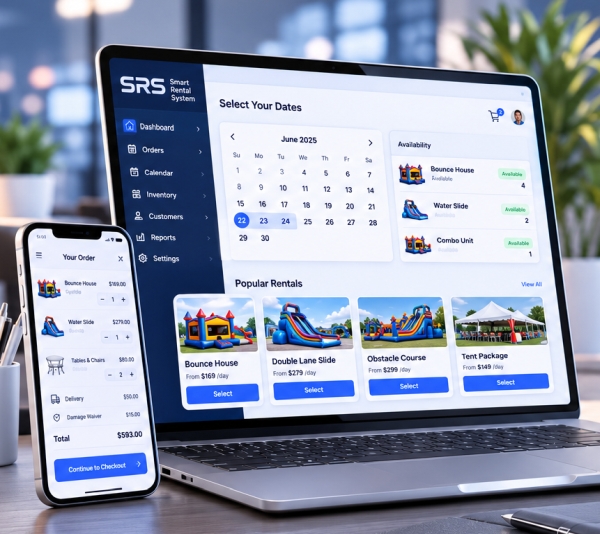
Let customers check availability and book online. Manage inventory, payments, deliveries and follow-ups from the same system, so your team has the details it needs for every order.
Show customers what is available for their date, calculate rental prices and let them book online.
Bookings & inventory
Keep orders, stock counts, payments, staff tasks and customer history in one place.
Quotes & payment follow-ups
Follow up on quotes, unfinished checkouts and unpaid balances, and see which follow-ups lead to bookings or payments.
Delivery areas & pricing
Check delivery addresses and apply your minimums, fees and taxes before customers book.
How a booking works
One order, with all the details your team needs.
Dates, equipment, prices, payments and customer details stay with the order as your team prepares, delivers and collects it.
Customer chooses
Customers select rental dates, quantities and options from your booking website.
Date-aware selection
Customers see available quantities for their rental window.
Clear options
Add-ons, deposits, and fees stay attached to the order.
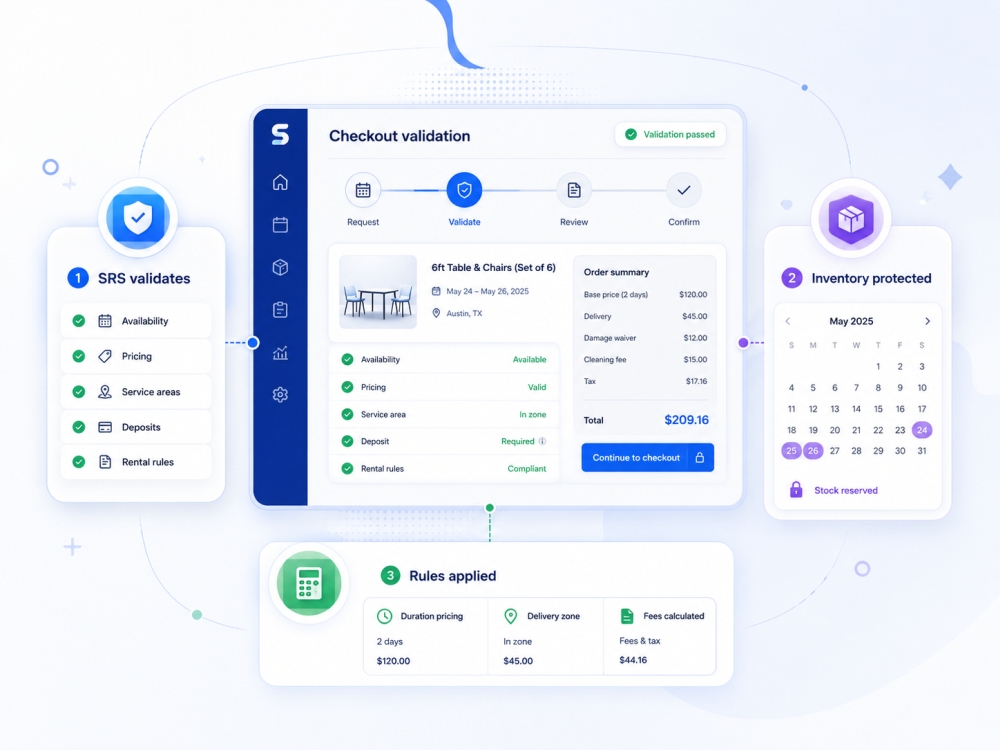
SRS checks the details
Availability, pricing, service areas, deposits, and rental rules are checked before checkout.
Inventory protected
SRS checks requested dates against available stock.
Rules applied
Duration pricing, delivery zones, and fees are calculated consistently.
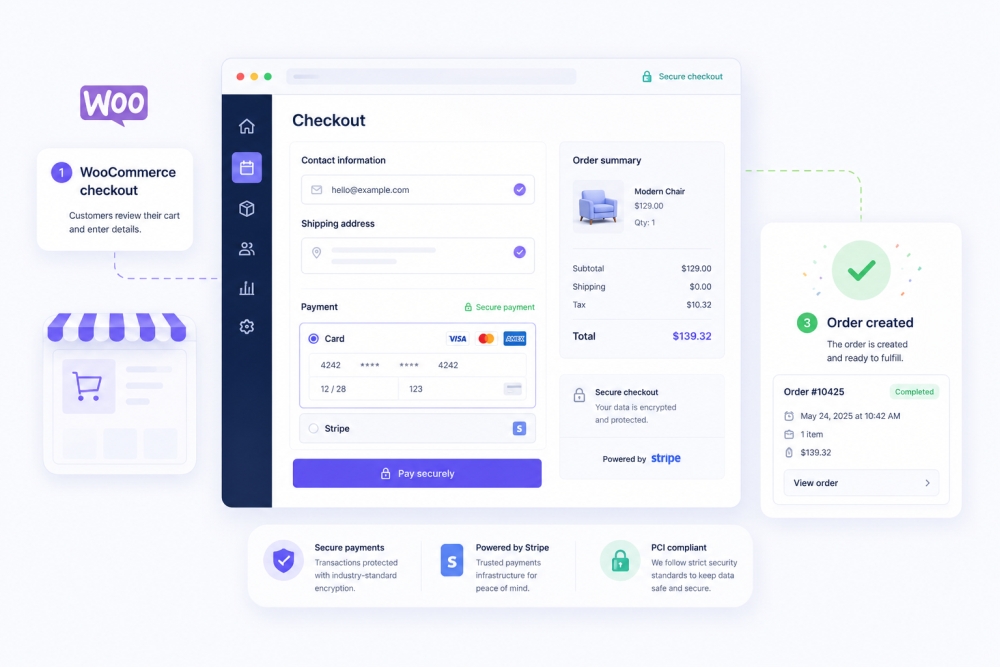
Secure checkout
The customer uses secure checkout while SRS keeps the rental details connected.
Secure payment
Use your configured secure payment methods.
Order created
Dates, items, fees, and customer details stay together.
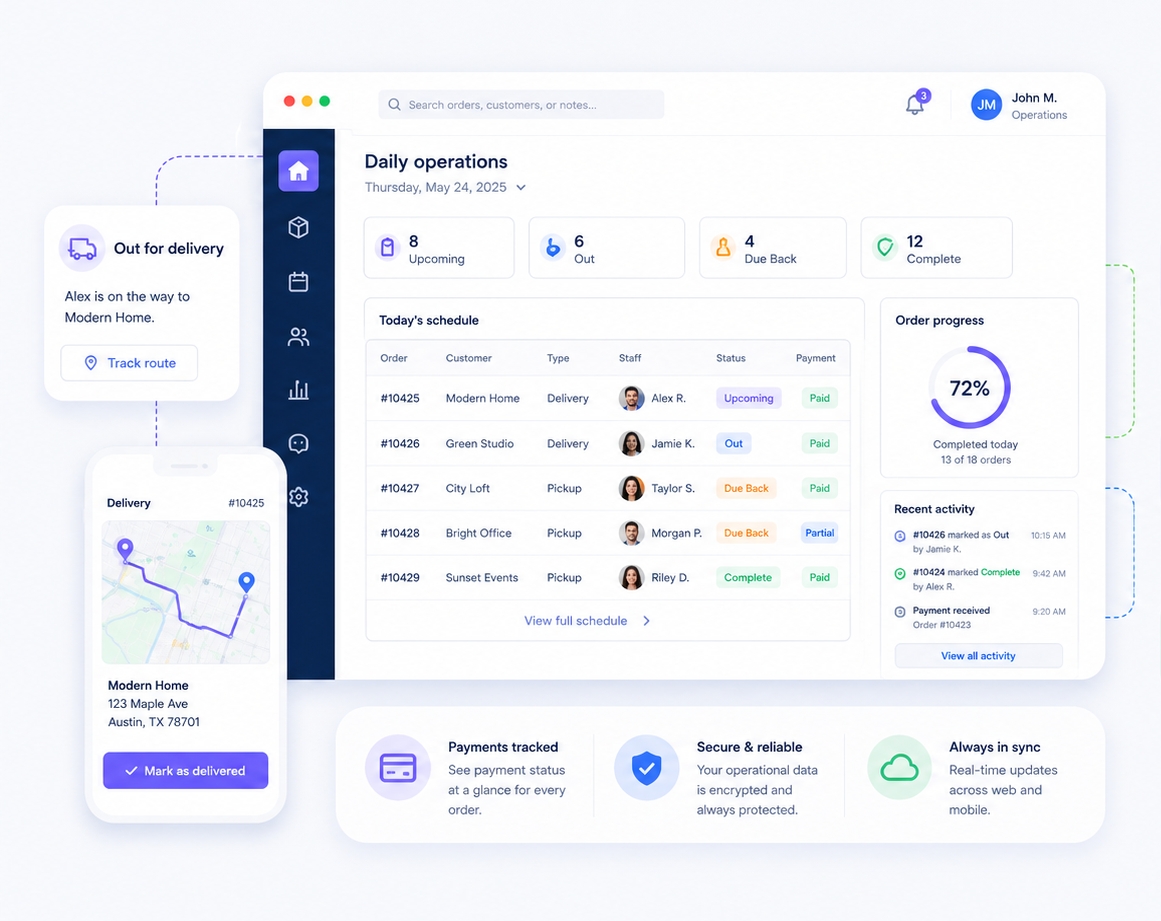
Team delivers and returns
Staff track preparation, delivery or pickup, payment status, and the completed return from one dashboard.
Clear staff status
Know what is upcoming, out, due back, or complete.
Operational history
Keep notes and order details where the team can find them.
Your daily workload
Run busy rental days with fewer surprises.
See upcoming orders, outstanding balances and jobs that need attention before the trucks leave.
Payment reminders & follow-ups
Send confirmations and reminders, and check the follow-up history when a customer calls.
Order details in one place
Keep dates, items, payments, customer details and notes tied to the order.
Keep your team informed
Give office staff, delivery crews and managers access to the details they need for their work.
System monitoring & data protection
Monitor key services. If a billing issue comes up, your existing products, bookings and data remain intact.
Built for rental owners
Manage your bookings and daily operations.
Make online booking easier, keep inventory accurate and give your team a clear view of the work ahead.
Online booking and payments
Online booking and payments
Let customers see what is available, get a price and pay a deposit or the full balance.
Inventory availability checks
Inventory availability checks
Check booked quantities, checkout holds and unavailable dates before accepting another rental.
Quote follow-ups
Quote follow-ups
Send follow-ups for unfinished bookings and unpaid balances, then review the results.
Price delivery before checkout
Price delivery before checkout
Apply delivery fees, order minimums and taxes before accepting a booking. Flag addresses that need your review.
Daily booking overview
Daily booking overview
Check the day’s bookings, equipment, balances and outstanding tasks before your team gets started.
Rental activity and reports
Rental activity and reports
Review rental revenue, equipment use, repeat business and follow-up results to help plan your next steps.
Plans for your rental business
Choose the right plan for your rental business.
Start with Essentials, free for your first year, or try Complete or Premier free for 30 days. Choose the plan that fits your catalog, setup needs and level of support.
Choose your plan. Start free. Add a payment method to begin—nothing is charged today. Essentials remains free through your first year; Complete and Premier begin monthly billing only if you continue.
First year free
SRS Essentials
For smaller rental businesses getting started with online booking and day-to-day management.
Freefor the first year
Then $49/month
Essential SRS booking and operations tools
Up to 10 qualifying rental products
Starter booking website included
Guided starter setup
Essential connections
Product and setup guidance
Best value • 30 days free
For established rental businesses
SRS Complete
For established rental businesses that need a website, professional setup and tools to manage a growing catalog.
$99/ month
Unlimited qualifying rental products
Ready-to-use rental website
Professional setup included
Catalog migration and configuration
Managed hosting included
Priority product support
For more complex operations
SRS Premier
For larger rental businesses with multiple operations or more complex setup needs.
$199/ month
Everything in SRS Complete
Built for high-volume or multi-operation teams
Larger catalog migration scope planned before work begins
Advanced workflow configuration
Integration requirements scoped with your team
Dedicated implementation planning
Only active rental products with a standard unit rental price over $50 count toward the Essentials limit. Inventory quantities and lower-priced items do not count. Compare every feature.
Third-party subscriptions and usage charges are separate, including SMS providers, payment processing, accounting services, email and marketing providers, mapping services, analytics and advertising platforms, domains, message credits and transaction fees.
Moving to SRS
Bring your rental catalog with you.
We can import the products we agree on from your current website or a CSV file. Before launch, we review the catalog, set up your rental rules and test booking and payments.
Choose SRS Essentials for a newer business with a smaller qualifying catalog. Your first year is free, then Essentials is $49/month. Choose SRS Complete for a ready-to-use system with more tools and support, or Premier for advanced integrations, complex migration and dedicated guidance.
Can I try any SRS plan before paying?
Yes. Every plan includes at least 30 days free. Add a payment method to begin, but nothing is charged today. Essentials remains free through your first year. Complete and Premier begin monthly billing only if you continue after the trial. Third-party provider costs and separately scoped custom work are not part of the free trial.
How long is the SRS Essentials free period?
SRS Essentials is free for the first 12 months, then $49/month. The ongoing price is shown before you sign up.
What counts toward the SRS Essentials product limit?
Essentials supports up to 10 qualifying products. Only active rental products with a standard unit rental price over $50 count. Quantities and lower-priced items do not count, so 100 chairs rented at $2 each are not treated as 100 products. Contact our team if you need a higher product limit.
What makes SRS different from a basic booking website?
SRS combines online booking with inventory, delivery areas, deposits, balances, customer history, staff tasks, reports and follow-ups. Your team can manage the work after the booking as well as the booking itself.
Can SRS handle complicated rental pricing?
Yes. SRS supports more than 20 rental pricing and fee rules, including duration, overnight, weekend, holiday, rush, bundle, repeat-customer, service and setup-related adjustments. The rules used for your operation are configured and tested during setup.
How does SRS reduce booking conflicts?
SRS checks overlapping availability for the requested dates and times. When checkout holds are enabled, it can temporarily hold the relevant inventory while a customer completes checkout. Availability is still validated before the booking is accepted.
What is SRS Automated Recovery?
Automated Recovery checks critical parts of SRS every 30 seconds. When it detects a supported problem, it can apply the approved SRS-specific solution and verify the result. If the problem persists, returns or cannot be handled safely, it is escalated to our technical team with the diagnostics and recovery history already collected. It supports the technical team; it does not replace them.
Can customers pay a deposit instead of the full balance?
Yes. You can offer deposits or payment in full, track balances, send payment links and set up reminders using your configured payment service. Provider accounts, approval, eligibility and transaction fees are separate.
What happens when a customer leaves checkout?
If the customer has provided the required contact details, SRS can save the unfinished booking for follow-up and provide a quote or payment link. You can track which follow-ups lead to bookings. Results depend on your settings, message delivery and the customer deciding to book.
Can you move the products from my current website?
Yes. Our team can move your product catalog to SRS free of charge. We review your website or CSV, check the imported products and help set up your rental rules before launch. We’ll also review whether customer records and past orders can be transferred from your current system.
Will my staff need to manage the technology?
Your team manages bookings and rentals. SRS handles the platform and product updates included in your plan.
Can I upgrade later?
Yes. Start with the plan that fits now and move up as your catalog, team, integrations or operational complexity grows.
How quickly can we launch?
Launch timing depends on your catalog, migration and configuration requirements. After reviewing these, we provide a plan with responsibilities and checkpoints.
Are third-party subscriptions and usage fees included?
SRS includes the feature or integration access described by your plan. Customer-owned provider accounts, API credentials, subscriptions, message credits, transaction fees, ad spend and usage charges are separate unless your proposal explicitly says otherwise.
What happens if a subscription payment is late?
SRS provides a fixed 30-day grace period for a failed payment. If billing is still unresolved afterward, licensed services and publishing another qualifying product can be paused temporarily. Existing storefronts, products, bookings and data remain online and are not deleted.
How do I manage billing and payment history?
Use the secure Member Account page to see membership status, member-since date, connected websites, invoice history and Stripe-hosted payment controls.
What should I prepare before moving my catalog?
Have your current website address or product CSV ready, along with any pricing, availability and delivery rules you want us to review. We’ll agree on what to bring over before setup begins.
Can you bring over customer records and past orders?
Customer records and historical orders are scoped separately from the product catalog. Tell us which system you use and what you need to keep so we can review the available data.
Will we review the setup before going live?
Yes. Imported products, rental rules, bookings and payments are checked before launch. The launch plan sets out the responsibilities and checkpoints for your setup.
Do I need my own payment and messaging accounts?
Customer-owned provider accounts, credentials and usage charges are separate unless your proposal says otherwise. We’ll review which services your rental business needs during setup.
Where can I get help with my SRS account?
Contact our team through the Contact Us page. For membership status, invoices and payment details, use Member Account.
What happens if Automated Recovery cannot fix a problem?
If a supported problem persists, returns or cannot be handled safely, it is escalated to the technical team with the diagnostics and recovery history.
Will your team move my business to SRS for free?
Yes. Our team can help you move to SRS free of charge. We review your current setup, confirm what can be transferred and help prepare your catalog and rental settings. Your SRS subscription and any third-party service charges remain separate.
Do I have to import my products myself?
No. Our team can handle the move for you free of charge. Send us your current website address or an available product export, and we’ll guide you through the next steps.
What product information can you bring over?
We can review product names, descriptions, prices, photos and categories from your website or CSV. What can be transferred depends on the information your current system makes available. We check the imported details with you before launch.
Can I move to SRS if I don’t have a CSV file?
Yes. Share your current website with us. We’ll check whether its catalog can be imported directly and explain any information we still need.
Will my prices and delivery rules stay the same?
We’ll review your prices, delivery areas, fees and booking rules with you and configure the supported settings in SRS. These rules need to be checked rather than assumed to transfer automatically.
Should I cancel my old system before moving?
No. Keep it available while we review the data and prepare your SRS setup. Agree on the switch date with our team first so you can check upcoming bookings and avoid losing access to information you still need.
Can we check upcoming bookings before switching?
Yes. Review your upcoming bookings with our team as part of the move. We’ll confirm what can be transferred, what needs to be entered separately and how to check availability before opening bookings in SRS.
Will moving change my website address?
Tell us whether you want to keep your existing domain or use a different address. Our team will review the setup with you before launch. Domain registration, renewal and third-party charges are separate.
Will you show my team how to use SRS?
We’ll guide you through the setup and the everyday tasks your team needs, including reviewing orders, managing your catalog and finding payment details. Discuss any additional training needs with us before launch.
What does “ready-to-use” mean?
We prepare your rental website and essential settings so your team can focus on running rentals. Your catalog, booking rules and customer booking experience are reviewed before launch.
Does SRS Complete limit bookings, team members or locations?
Complete includes unlimited qualifying products, bookings and team use, with multi-location and operational tools included. Review the plan comparison for the complete feature list.
What makes Premier different from Complete?
Premier is for larger or more complex operations. It adds deeper integration and workflow planning, larger migration projects, training and dedicated guidance. We agree on your requirements before setup.
Can you migrate my existing catalog and customer data?
Our team can help you move free of charge. We review your catalog and check whether customer records and past orders can be exported from your current system. We confirm what can be transferred before starting; not every system exposes the same information.
Can SRS follow up on quotes automatically?
Yes. You can configure quote follow-up messages and timing so customers receive a reminder without your team sending each email individually. Message delivery depends on your setup and the customer’s contact details.
Can I offer referral rewards?
SRS supports referral offers with configurable rewards. Your team chooses the offer and the message rather than using the sample amounts shown on our website.
Can SRS ask customers for reviews after an event?
Yes. You can set up automatic review requests after an event using your review link. Requests invite honest feedback; they do not guarantee a particular rating.
How do book-again reminders work?
SRS can send a reminder before the anniversary of a customer’s previous event. You choose the timing and message to encourage another booking.
Can I reconnect with customers who haven’t booked recently?
Yes. Re-engagement campaigns can reach customers after a period without a booking. You can include a message or discount offer based on your settings.
Can I suggest extras to increase the value of a booking?
Yes. SRS supports related product and add-on suggestions, such as tables, chairs or other extras. The suggestions shown depend on your catalog and configuration.
Can I see whether follow-ups lead to bookings?
Conversion reporting helps you review quotes, bookings and follow-up results. Use it to see which opportunities return and where your team should focus. The numbers in our marketing illustrations are examples, not promised results.
No matching questions. Try another word, or contact our team below.
Tell us about a typical booking or a problem you deal with often. We’ll show you how SRS handles it, from the customer’s order to your team’s daily work.